Fieldpacket
v0.1.0 MIT Node 24+
Field research packet — build spec DOC / FP-0001

Open source · agent-driven

Fieldpacket

The research-to-report workflow.

Brief your coding agent the way you'd brief a researcher. It decomposes the question, sends parallel agents after sources, audits what came back, and synthesizes a decision-grade report — then publishes it as a designed, self-contained document in a library you host yourself.

0API keys
40–100+Sources cited
1 filePer report
3 cmdsTo install
Method
Parallel research agents
Runs on
Claude Code · Codex
Requires
Node 24+, an agent
Output
Standalone HTML · PDF
License
MIT
01

Ask an AI to research something and you get a listicle

Shallow sourcing, no sense of what's recent, no acknowledgement that credible sources disagree — and a wall of prose you can't act on. Fieldpacket is built around the opposite assumption: that you're going to use this document to make a decision, possibly months later, possibly on a phone.

02

Two halves, one pipeline

research → report

Half one — the research

An army of research interns

The heavy lifting. It scopes the job by tier, breaks the topic into distinct angles before searching anything, then runs one agent per subtopic — each doing broad searches, deep-reading primary sources, and closing its own gaps.

  • ScopeFocused (5–7 subtopics) · Standard (7–9) · Comprehensive (9–12)
  • AnglesCurrent state, technical depth, comparisons, real-world use, hard data, criticism, economics, future
  • AuditSource count and quality, contradictions, thin subtopics — with supplementary agents where it's short
  • Output4,000–10,000+ words, 40–100+ cited sources, synthesized by theme rather than stapled together

Half two — the packet

Designed, then adversarially checked

A build pass renders the markdown against a house design standard. Then a second agent attacks the result — and it is genuinely allowed to reject the first agent's work.

  • BuildStamped hero with the headline finding, KPI stamps, ticket metadata, sticky numbered TOC, decision components
  • PolishTables usable at 360px, every row and citation checked against the source, AA contrast, reduced motion, print CSS
  • PublishRebuilds the library index, then verifies — a report isn't done until verification passes
  • FormatOne self-contained HTML file. No framework, no build step, nothing to rot
03

What comes out the other end

real output, not mockups

Every image below is the genuine article — rendered from a report this pipeline produced. You can read the whole thing.

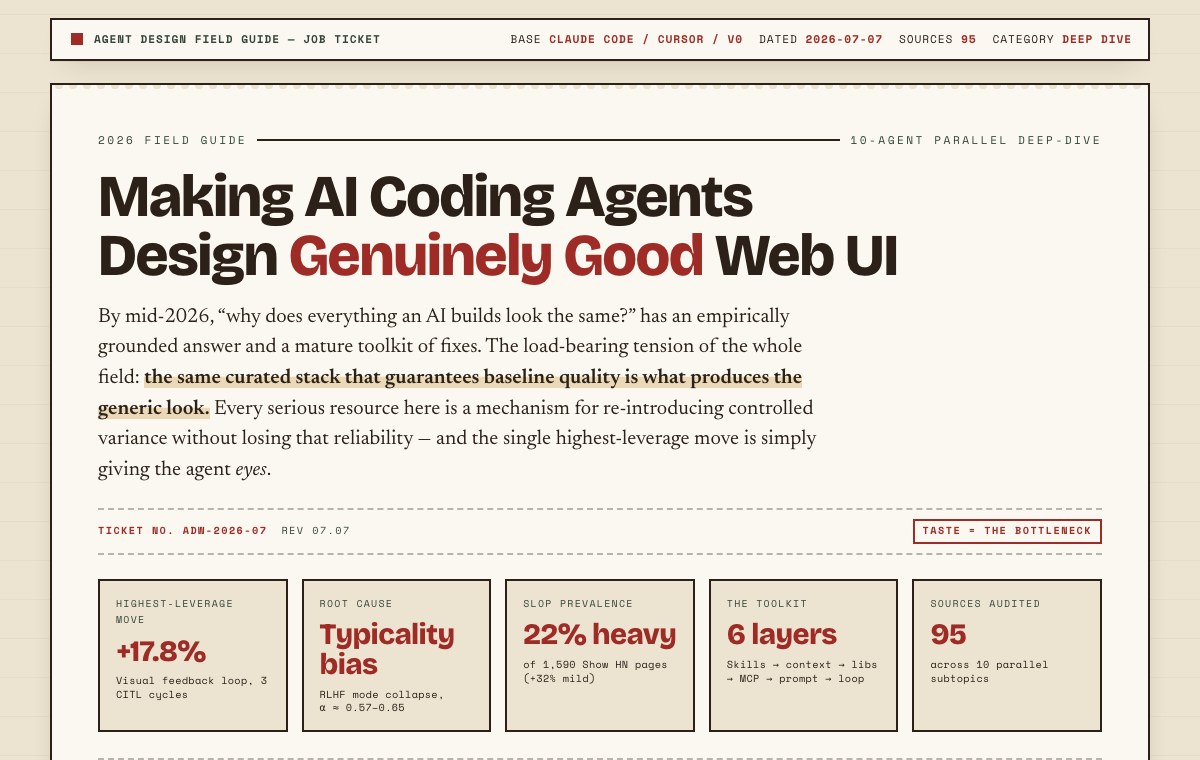
A published field packet: a dark stamped header states the key finding, above a large title, thesis, and a metadata row.
The packetThe hero leads with the single most useful finding — not a throat-clearing introduction. Underneath: what it is, how it was researched, and how many sources stand behind it.
Further down a report: comparison matrices, verdict cards and itemised figure rows.
Decision componentsComparison matrices, verdict cards, and itemised figures with dotted leaders — chosen to fit the content rather than applied as decoration.
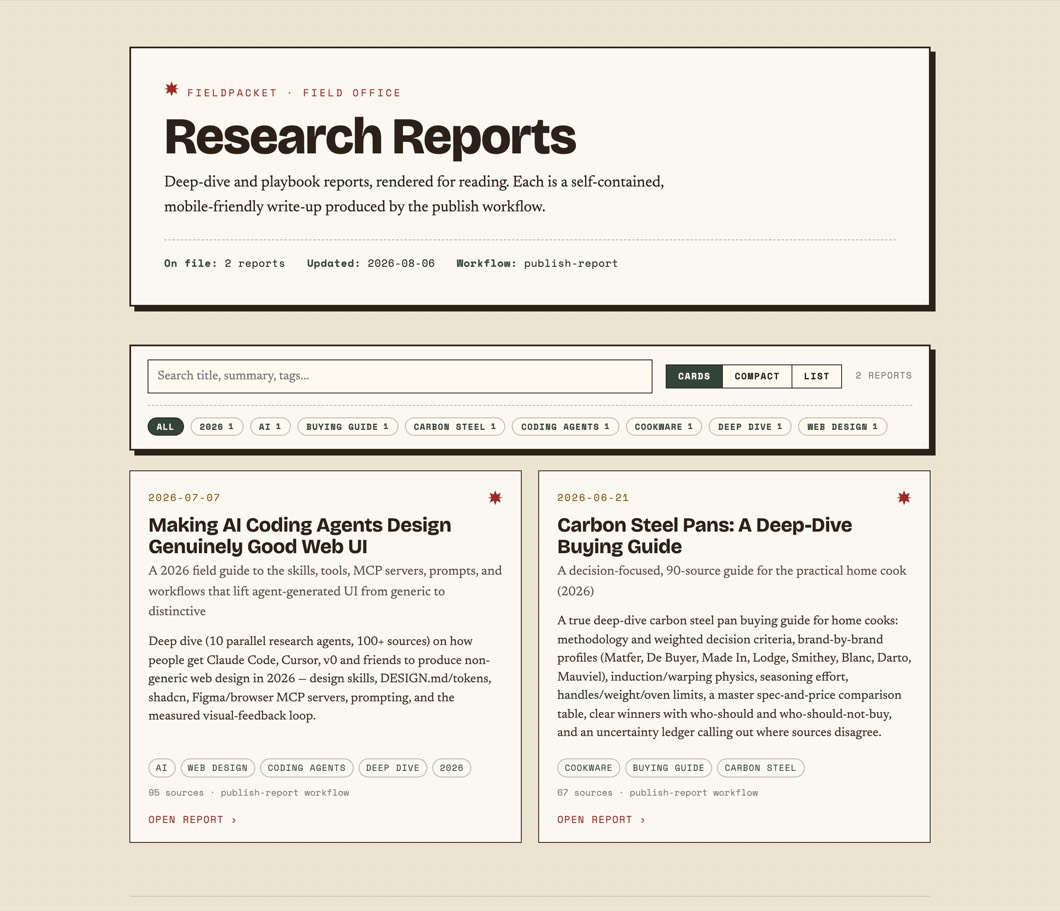
The library index: a masthead above a search box, tag chips with counts, and report cards.
Your libraryLive search, tag chips with counts, and a cards/compact/list density toggle — all client-side, and it still works with JavaScript off.
The same report rendered on a phone-width screen, remaining readable.
At 390pxThe polish pass rejects any report whose tables overflow on a phone. This is the same document, unmodified — because a reference you can't read in the car isn't a reference. Tablesscroll in-place, first column pinned Contentscollapses to a tap-open drawer Motionhonours prefers-reduced-motion Printown stylesheet, link URLs expanded
04

The house standard

the bar every report is held to

The design brief isn't a suggestion — it's a spec with rejection criteria, which is why output stays consistent instead of drifting into whatever the model felt like that day.

Rejection criteria

A report goes back to polish if it reads as a plain article, if it carries fewer than two decision components, if a table overflows on a phone, or if any source link, price, or row from the research went missing. Thin output is a failure even when the content is correct.

05

Install and brief it

no API keys, ever

Your coding agent is the engine — Claude Code, Codex, whatever you already pay for. There's no LLM SDK, no key to paste, and no per-report cost beyond the subscription in your pocket.

Then talk to it like a person

"I want a deep dive on carbon steel pans for a home cook. I care about induction compatibility, how much seasoning babysitting they really need, and whether the expensive ones are meaningfully better than a $40 Lodge. Skip anything that reads like an affiliate listicle — I want real sources and I want to know where they disagree. Publish it to my library when it's done."

The more you say about what you actually care about, the better the report. It scopes the job, shows you the plan, and you steer from there — adjust the angles, push back, ask for another section, all in the same conversation.

06

The deterministic half

what the CLI handles

The agent researches and designs. Everything that should be repeatable rather than improvised is a plain command.

CommandWhat it does
fieldpacket initCreate the library
fieldpacket indexRebuild the browsable index from the metadata sidecars
fieldpacket serveServe the library locally, loopback by default
fieldpacket listList published reports, newest first
fieldpacket verifyCheck the library, or one report, is well formed
fieldpacket pdfRender a faithful single-page PDF, exactly as it looks
fieldpacket doctorCheck the environment

← scroll the table →

Your library is just files

~/fieldpacket/
├── source/<slug>.md      the research markdown
├── reports/<slug>.html   the published field packet
├── meta/<slug>.json      sidecar the index reads
├── pdf/                  rendered PDFs
└── index.html            the browsable library

Static files, so you can host them anywhere — or keep the whole thing on your own machine and never publish a word of it.

07

Reasonable questions

Do I need an API key?

No — and there's nowhere to put one. Fieldpacket runs inside your coding agent's session, so the research and the design are done by the subscription you already have. Nothing calls an LLM API directly.

What does it actually install?

Two skills (the research method and the publishing workflow) linked into your agent, two workflow scripts, and a small TypeScript CLI. No build step and no runtime dependencies — Node 24 runs the TypeScript directly.

Is the research any good, or is it confident nonsense?

It's as good as the sources it finds, and the method is built to make that auditable rather than to hide it. Every claim is cited inline, the source list is annotated with what each one contributed, and where sources conflict the report says so instead of splitting the difference. You can check its work — that's the point of the audit trail.

Can I use it for something other than product research?

Yes. Buying guides are the obvious fit, but the same pipeline handles technical landscapes, market briefs, travel and itinerary research, and playbooks. The research skill adapts its subtopics to the question; the design standard doesn't care what the subject is.

Does my research leave my machine?

Only insofar as your agent searches the web, same as any research session. The library itself is local files. The built-in server binds to loopback, and nothing is published anywhere unless you choose to upload it.